🇬🇷

Greece Prepaid eSIM Data

High-Speed Local Cellular Data • Instant Digital QR Delivery • Zero Roaming Fees

Stay seamlessly connected across Greece with our high-speed, prepaid digital eSIM. Connect immediately to top-tier local partner networks upon landing without swapping plastic SIM cards, visiting airport kiosks, or paying expensive international roaming rates.

Top Local Networks
Connects to leading local 4G/5G tier-1 carrier towers automatically.
Instant QR Delivery
Delivered straight to your email. Simple 1-minute camera scan setup.
Hotspot / Tethering
Full personal hotspot support to share data with laptops & family.
Keep Your WhatsApp
Dual SIM active. Keep your original number for calls and messaging.

How to Choose Between the Package Tabs

We organize our live rates into two dedicated tabs above to help you choose the best plan for your itinerary:

TAB 1 • SINGLE DESTINATION

Country Package

Contains all packages that are exclusive to Greece. If your trip is dedicated solely to visiting Greece, these plans offer the most economical rates, highest data allowances, and direct access to local premier carrier networks.

  • Tailored specifically for Greece domestic travel
  • Best cost-per-GB value with zero cross-border overhead
  • Supports both fixed data and daily reset quotas
TAB 2 • MULTI-COUNTRY TRAVEL

Regional Package

Contains all packages that cover multiple countries alongside Greece. If you are traveling through 2, 3, or more countries on a single trip (or transiting through layover destinations), you must review these packages to maintain uninterrupted connectivity without swapping eSIM profiles.

  • Multi-destination coverage including Greece
  • One single QR code stays active across international borders
  • Ideal for regional tours, stopovers, and cross-continent trips
Quick Tip: Click the “Country Package” or “Regional Package” tab at the top of this product page to browse live pricing, package options, and copy your instant checkout code.

How to Place Your Order: Step-by-Step Guide
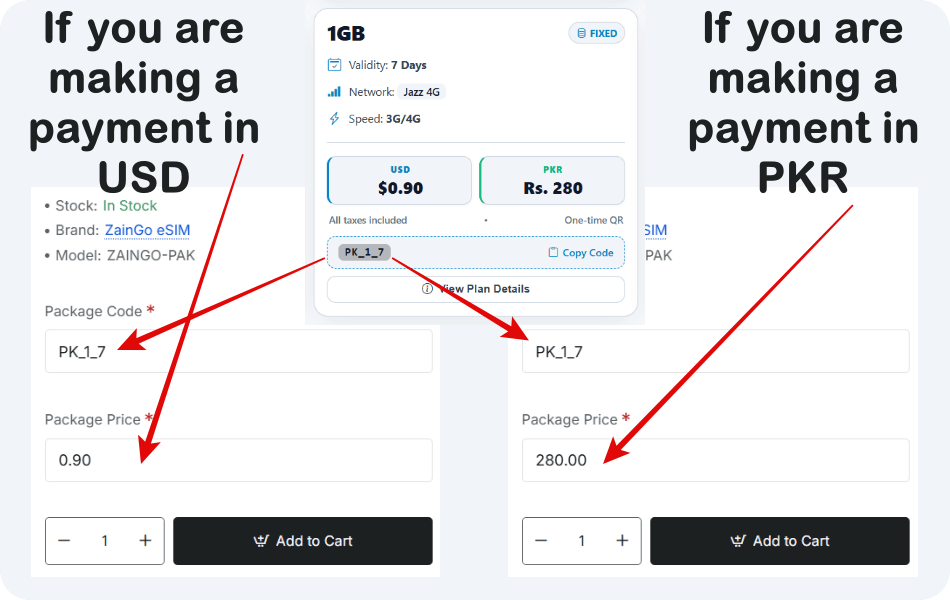
Follow these simple steps to ensure your eSIM order is configured correctly and processed with instant digital delivery:
How to enter Package Code and Package Price in Product Options above Add to Cart
Visual Reference: How to fill in the required Package Code and Package Price fields in the Product Options section above the Add to Cart button.
1 STEP 1

Select and Copy the Package Code

Choose your preferred package from the “Country Package” or “Regional Package” tab at the top of this page.

Click the “Copy Code” text/button located on the package card to automatically copy the exact package code to your clipboard.

Paste this code directly into the “Package Code” field in the Product Options section (located directly above the Add to Cart button on this page).

Avoid manual typing: Please avoid manual typing, as this field is highly sensitive and directly determines the QR code issued for your eSIM.
2 STEP 2

Enter the Package Price Based on Your Payment Currency

Enter the corresponding package price into the “Package Price” field in the Product Options section based on your preferred payment method:

Paying in USD Crypto / Digital Wallets

If you are paying in US Dollars, such as via cryptocurrency or international online USD wallets, switch the store's currency selector at the top of the page to USD, then enter the price displayed in USD.

Paying in PKR Pakistani Banks / Mobile Wallets

If you are paying via local Pakistani bank transfer or mobile wallets, switch the store's currency selector at the top to PKR, then enter the price displayed in PKR.

Important Notice on Accuracy

Ensure the entered code and pricing match your selected currency precisely. Discrepancies or errors will cause processing delays, whereas accurate details allow us to deliver your eSIM QR code as quickly as possible.

What You Will Receive: Instant Digital Delivery

Delivered Directly Via:
WhatsApp Telegram

Upon successful order completion and payment confirmation, customers receive an automated delivery message containing their complete eSIM provisioning parameters. There is no physical SIM card to wait for. Your profile is ready immediately.

Official Delivery Message Template Sent on Order Completion
ZainGo eSIM for Greece
Data: 100MB Data Package
Data Validity: 7 Days Package
Slug: *_0.1_7
O.ID: 123456
Create Time: 23/01/2026 6:59 pm
Activate Before: 22/07/2026 6:59 pm (GMT+5)
SM-DP+ Address: rsp-eu.simlessly.com
Activation Code: 2ED8E29855314B6DA96F2F28AE654321
LPA string: LPA:1$rsp-eu.simlessly.com$2ED8E29855314B6DA96F2F28AE654321
One-Tap Mobile Installation: This message includes your dedicated installation link (https://qr.gozaingo.com/yJRhX). When opened on any smartphone, it guides you step-by-step through installing the eSIM profile onto your device with a single tap, or displays the QR code for instant camera scanning.
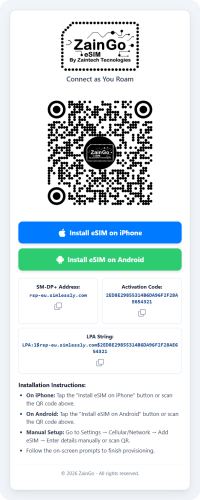
Mobile View
ZainGo eSIM Digital Delivery and Installation Preview
Live mobile web page opened by your delivery link

How It Works: 3-Step Simple Setup

1
Choose Plan & Order

Copy your plan code from the rates tab above, paste into Product Options, and click Add to Cart.

2
Scan QR Code

Open your phone Settings > Cellular / Mobile Data > Add eSIM, then scan the delivered QR code.

3
Connect on Arrival

Turn on Data Roaming for your eSIM line upon landing in Greece to connect instantly.

Device Compatibility Check: Ensure your smartphone is carrier-unlocked and supports eSIM technology (e.g. iPhone XS/XR or newer, Samsung Galaxy S20 or newer, Google Pixel 3 or newer). Dial *#06# on your device keypad—if an EID number is displayed, your device supports eSIM!

Frequently Asked Questions

Your eSIM remains valid for 180 days from purchase, allowing you to buy ahead of your journey. You can install it anytime within this period. Once your device connects to a supported network at your destination, your data plan validity (e.g. 7, 15, or 30 days) begins counting down.
Because digital eSIM profiles generate instant carrier authentication keys, purchases are strictly non-refundable once issued. We recommend verifying your phone is carrier-unlocked and eSIM-ready (dial *#06# to verify your EID) prior to placing your order.
As direct authorized wholesale partners, global telecommunication feeds adjust based on currency fluctuations and carrier wholesale promotions. Our website Live Rates feed always displays the most updated real-time tariff.
If you are traveling exclusively to Greece, a single-country plan provides the best value and highest data allowance. If your itinerary includes multiple stops across neighboring countries or continents, select a Regional Package from the tab above so your eSIM stays connected across borders without switching SIMs.
Yes! All modern smartphones support Dual SIM Dual Standby (DSDS). You can keep your primary physical SIM active to receive OTP bank SMS and WhatsApp verification codes, while routing all mobile data through your Zaingo eSIM to eliminate roaming charges.
No. For security and telecommunication regulatory compliance, an eSIM profile is bound to the single device it was initially installed on and cannot be transferred across different phones once activated.
This is a dedicated high-speed cellular data service. While standard cellular voice minutes are not included, you can use all VoIP calling and messaging apps without restrictions—including WhatsApp, FaceTime, Skype, Zoom, Telegram, and Google Meet.
Yes! Personal hotspot sharing is 100% enabled. You can connect your laptop, tablet, Kindle, or family devices to your smartphone's shared connection wherever local cellular service is available.
We recommend scanning the QR code and installing the profile while at home or at the airport using your reliable Wi-Fi. Keep the eSIM line turned off until you board your flight or touch down in Greece. Once you arrive, switch on the eSIM and enable Data Roaming.
To top up additional gigabytes or extend validity, simply contact our customer care team on WhatsApp or Telegram with your Order Number or ICCID. We will renew your balance promptly.
Do not delete the eSIM profile from your phone while you still have remaining data or plan duration, as deleted profiles cannot be recovered. Once your trip is over and your data plan has fully expired, you can safely navigate to your phone's Cellular settings and select Remove eSIM.
If you experience connectivity trouble:
  1. Ensure Data Roaming is toggled ON under your eSIM settings.
  2. Verify your phone's Cellular Data is assigned to the eSIM line (not your physical SIM).
  3. Toggle Airplane Mode ON for 10 seconds and OFF to force a re-connection to the nearest tower.
  4. Check that your APN is set to automatic.